Upload your first ticket or toll invoice
Upload a photo or PDF of a parking ticket, traffic citation, or toll invoice for Kelviz to read automatically.
Last updated
Who can do this: Owners, admins, and operators.
Steps
- 1
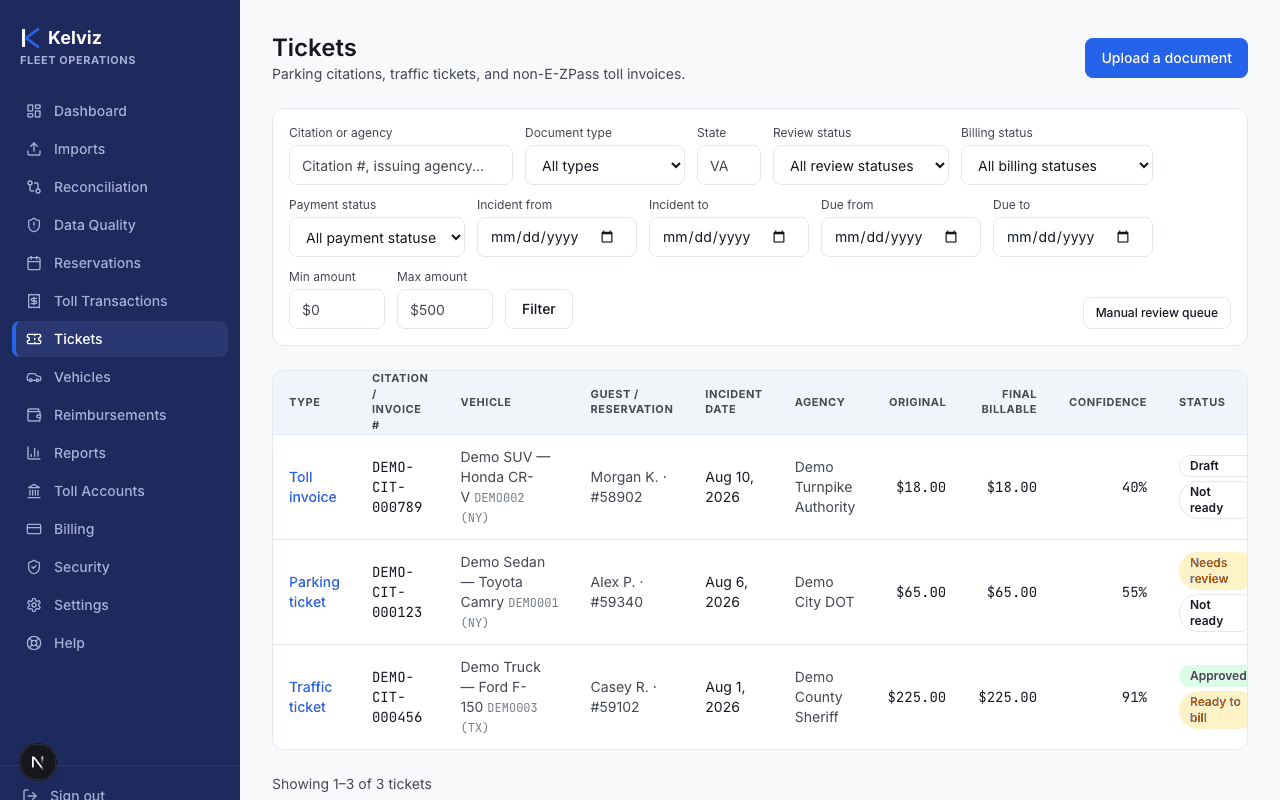
Go to Tickets in the sidebar, then select Upload a document.
- 2
Drag and drop a file, click to browse, or select Take a photo to use your device camera.
- 3
Wait for processing to finish.
Kelviz reads the document and extracts fields like citation number, issuing agency, amount, and due date automatically — this typically takes well under a minute.
Expected result
A draft charge is created and shows up in your Tickets list. Extracted fields are a starting point, not a final answer — open the ticket to review, correct, match it to a vehicle and reservation, and approve it before it's ever billed to a guest.
Common errors
- "Only JPEG, PNG, HEIC, or PDF files are allowed."
- Convert the file to one of those formats before uploading.
- "File must be 25MB or smaller."
- Compress the image or PDF, or split a multi-page scan into single-page files.